

Model Context Protocol: Security Risks and Mitigations
Key takeaways
- What MCP is. The Model Context Protocol is the standard way an AI agent connects to tools, files, databases and APIs. Every server you connect sits inside your agent's trust boundary.
- April 2026. OX Security reported that the STDIO transport in the official MCP SDKs passes configuration straight to the operating system shell, with an estimated 200,000 exposed instances.
- Tool poisoning. A tool description can carry hidden instructions that the model reads and the user never sees. The protocol has no native defence against it.
- Rug pulls. A server you approved on Monday can change its tool descriptions on Friday.
- What to do. Treat every MCP server as untrusted third party code. Read the full tool descriptions, pin versions, isolate servers, and require approval for anything sensitive.
AI agents are only as useful as the things they can reach. MCP, the Model Context Protocol, is how they reach them. It gives a model a standard way to read files, query databases, call APIs and run commands, and by now it sits inside Claude Desktop, Cursor, Windsurf and dozens of other tools.
That is also why MCP security has become one of the busiest corners of AI security. Each server you connect is a new piece of code and a new set of instructions that your agent will trust. This guide explains how MCP attacks work, what has been disclosed, and how to test an MCP server before you rely on it.
What is MCP?
MCP is an open standard introduced by Anthropic in late 2024. An MCP server exposes tools to an agent. Each tool has a name, a description and a schema. The model reads those descriptions to decide which tool to call and how.
There are two ways a client talks to a server. Streamable HTTP is meant for remote servers. STDIO is the default for local ones, where the client launches the server as a process on your own machine. STDIO is the path shown in the official documentation, which is why it became the most common one.
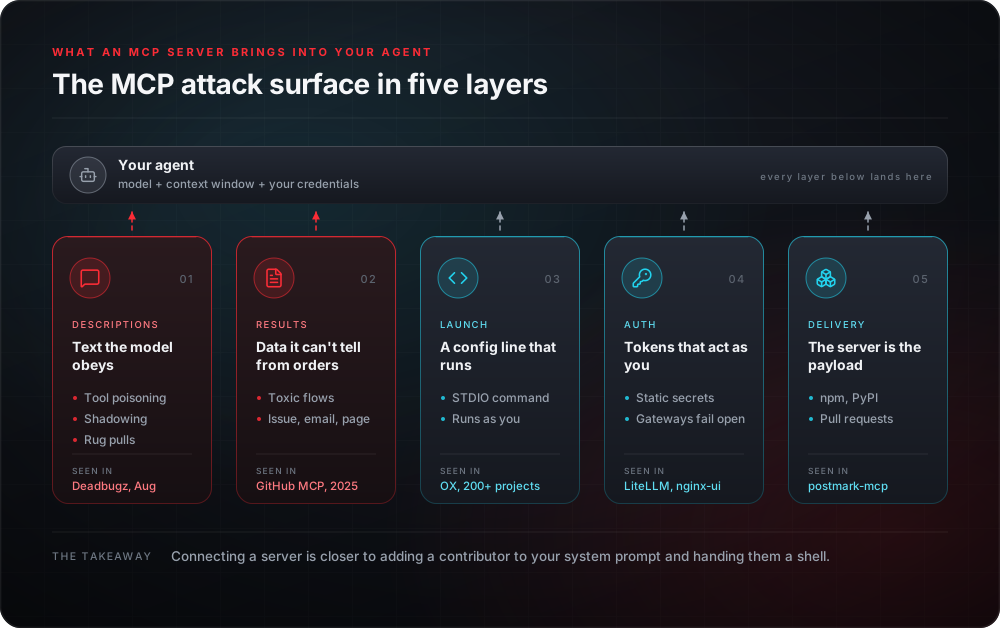
Two facts make this a security problem. First, the model treats tool descriptions as trusted context, so whoever writes the description influences the agent. Second, a connected tool acts with the agent's permissions. A file tool inside an agent that holds your cloud credentials can reach your cloud credentials.
How MCP attacks work
Most MCP server vulnerabilities fall into a handful of patterns.
1. Command execution through STDIO. The client starts a local server by running a command from a configuration file. If an attacker can influence that configuration, they can make the host run their command. No exploit is needed, because running commands is what the feature does.
2. Tool poisoning. Invariant Labs described this in April 2025. Malicious instructions are placed inside a tool description. The model sees them and the user usually does not, because the interface shows a short summary. A tool called "add two numbers" can include a line telling the agent to read a private file and send it somewhere.
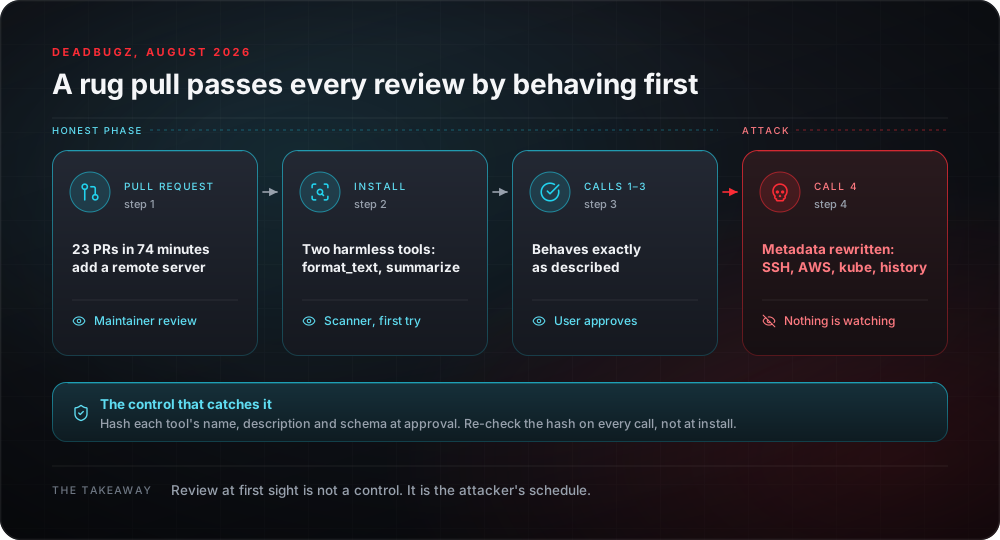
3. Rug pulls. A server behaves well when you approve it, then changes its tool descriptions or behaviour later. Approval at install time says nothing about what the server sends next month.
4. Cross-server tool shadowing. One malicious server writes a description that changes how the agent uses a different, trusted server. Invariant Labs showed that a single bad server can turn adjacent good ones against you.
5. Unauthenticated servers. The MCP authorization specification describes an OAuth 2.1 framework but marks authorization as optional. A scan in July 2025 by Knostic found 1,862 MCP servers exposed to the internet, and every one of the servers it sampled handed over its tool listings without any authentication.
6. Poisoned packages. MCP servers and the libraries around them are installed like any other software. On 21 October 2026 the AI gateway library LiteLLM spent about two hours as a malicious release, which we covered in our Black October write-up. That was a separate incident from the SDK issue below, and it shows the same lesson. Anything that sits between your agent and your tools is a supply chain target.
What has been disclosed
The biggest story came in April 2026. OX Security published research titled The Mother of All AI Supply Chains. The finding was that the STDIO transport in Anthropic's official MCP SDKs for Python, TypeScript, Java and Rust hands configuration parameters to the host shell without sanitising them. Any command passed in runs, whether or not it starts a valid MCP server.
OX reports an estimated 200,000 vulnerable instances across a supply chain with more than 150 million package downloads, and lists affected downstream projects including LangChain, Flowise, LibreChat and Windsurf. It also reports that Anthropic confirmed the behaviour is intentional and declined to change the protocol, which leaves the fix with each downstream developer.
Treat that last point as reported rather than settled. Read the original research and any vendor response before quoting it.
| What | Figure | Source |
|---|---|---|
| Estimated vulnerable instances from the STDIO design | About 200,000 | OX Security |
| Package downloads in the affected supply chain | More than 150 million | OX Security |
| Open source projects affected | More than 200 | OX Security |
| Public MCP servers exposed to the internet, July 2025 scan | 1,862 | Knostic |
CVE counts vary a lot between sources. Some blogs report more than 30 in two months and more than 40 by April. Those aggregates are not independently verified, so the table above sticks to figures from the researchers who produced them. Whatever the exact number, the direction is clear.
How to test an MCP server
Here is a practical order of work. It suits a security team reviewing a server before rollout, and it suits a red teamer scoping an engagement.
Step 1, build an inventory. List every MCP server your developers and agents use, where each one runs, who wrote it and which version is installed. Most teams find servers they did not know about.
Step 2, read the full tool definitions. Not the summary in the interface. Dump every name, description and schema field and read them like source code. Look for instructions aimed at the model, mentions of other tools, requests to read files, and language such as do not tell the user.
Step 3, check the configuration path. Find out where the STDIO command comes from. If any part of it can be set by a repository, a downloaded config or a user form, that is a command injection route.
Step 4, test for rug pulls. Hash the tool descriptions at approval time and compare them on every start. Any change should stop the agent and ask a human.
Step 5, test for shadowing. Connect a deliberately malicious test server next to a trusted one in a lab. See whether its descriptions can change how the agent calls the trusted server.
Step 6, test authentication and authorisation. Call the server without credentials. Call it as a low privilege user. Check whether the tool enforces its own access rules or trusts the agent to do it.
Step 7, test what the tools can reach. For each tool, list the data and actions it exposes. Then try to make the agent use it beyond its purpose through a poisoned document, web page or email.
Step 8, review the logs. Confirm you can see which tool was called, with which arguments, on whose behalf. If you cannot reconstruct a call, you cannot investigate one.
What to do this week
- Treat every MCP server as an untrusted third party until proven otherwise.
- Pin server versions and review updates, the way you would for any dependency.
- Run servers in isolation, with the minimum file, network and credential access.
- Never let a repository or a web page supply the command that launches a local server.
- Require human approval for tools that send data out, spend money or change records.
- Keep a per-server allow list, and remove servers nobody can justify.
Practise on real targets
Reading about tool poisoning is not the same as doing it. In the KageX FreakLabs course, the Tool Definition Poisoning lab gives you an agent that loads tool definitions dynamically. Your job is to inject a malicious description that redirects legitimate calls to an attacker controlled handler. The first labs are free and run in the browser.
If you want to test your own agent, Mirage is our open source browser extension that red teams AI systems. Tool definition poisoning is one of its attack classes, and it scores wins on real decoded side effects, not on a model's opinion.
Conclusion
MCP gives agents their reach, and every server you connect extends that reach to whoever wrote the server. The attacks are not exotic. A description the model obeys, a command the client runs, a token nobody checks, a package nobody reads. The defences are not exotic either: know which servers you run, read what they send in full, pin what you approved, isolate what you connect, and keep a human in front of anything that moves data or money.
You do not need a new tool to start. List the MCP servers your team already uses, read their full tool descriptions, and note which ones can reach credentials or send data out. Then test them the way an attacker would, before someone else does.
Frequently asked questions
What is MCP security?
MCP security is the practice of controlling what Model Context Protocol servers can do once they are connected to an AI agent. Every server contributes tool descriptions the model reads as guidance, code or credentials that run with your privileges, and output the model cannot tell apart from instructions. Securing MCP means inventorying servers, reading full tool definitions, pinning what you approved, isolating servers and requiring approval for sensitive actions.
What is MCP tool poisoning?
Tool poisoning is hiding instructions for the model inside an MCP tool's description. The model reads the full description; the user usually sees only a short summary. Invariant Labs demonstrated it in April 2025 with an arithmetic tool whose description told the agent to read private files and send them out through an extra parameter.
What is an MCP rug pull?
A rug pull is an MCP server that behaves well when you approve it and changes its tool descriptions or behaviour later. Because clients re-fetch tool definitions each session, whatever you reviewed at install time is not necessarily what the model reads today. The defence is to hash tool definitions at approval and compare them on every start.
What is the MCP STDIO vulnerability OX Security disclosed?
In April 2026 OX Security reported that the STDIO transport in the official MCP SDKs runs whatever command the configuration names, whether or not it starts a valid MCP server. Wherever untrusted input can reach a server definition, such as an add-a-server form or a config imported from a URL, that becomes command execution. OX estimated around 200,000 exposed instances across more than 200 downstream projects.
Is MCP safe to use?
MCP is safe in the way any privileged integration is safe: when you treat each server as untrusted third-party code. Keep an inventory, read full tool definitions, pin versions and definitions, run servers with minimal file, network and credential access, never let a repository or web page supply a launch command, and require a human to approve tools that send data out, spend money or change records.
How do you test an MCP server?
Build an inventory, dump and read every tool's full name, description and schema, trace where the STDIO command comes from, hash tool definitions and compare them on every start, connect a deliberately malicious test server beside a trusted one to check for shadowing, call the server without credentials and as a low-privilege user, try to push each tool beyond its purpose through a poisoned document or page, and confirm the logs show which tool ran with which arguments on whose behalf.